Voice recorder for iPhone

Record anything. Keep everything.

Rekorda records meetings, lectures, interviews and ideas with one tap, keeps going with the screen locked, and turns speech into searchable text right on your iPhone. No account. No subscription.

Free for iPhone with iOS 16 or later. Works offline.

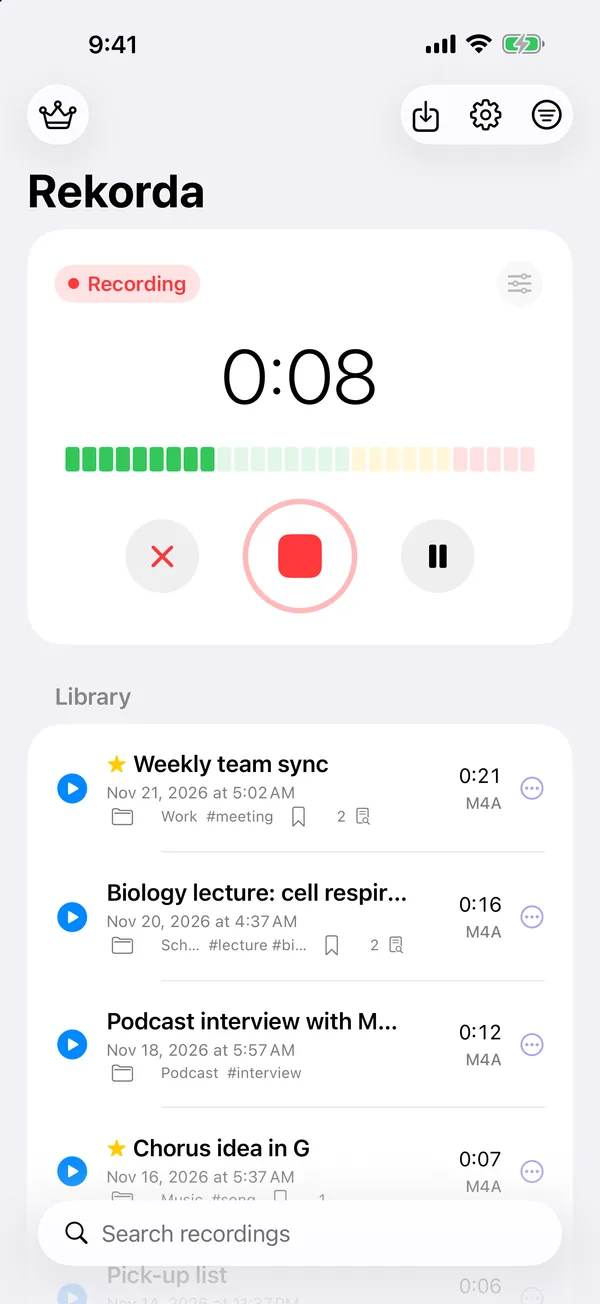
Rekorda recording: a red Recording label, a timer at 0:08, a level meter, and cancel, stop and pause buttons above the recordings library.
  • No subscriptionFree with ads. Remove them once with a single purchase.
  • Transcribed on your iPhoneSpeech becomes text on the device, not on a server.
  • No accountOpen the app and press record. Nothing to sign up for.
  • Free MP3 exportMP3, AAC or WAV, with no paywall in the way.
How it works

From one tap to a transcript you can search

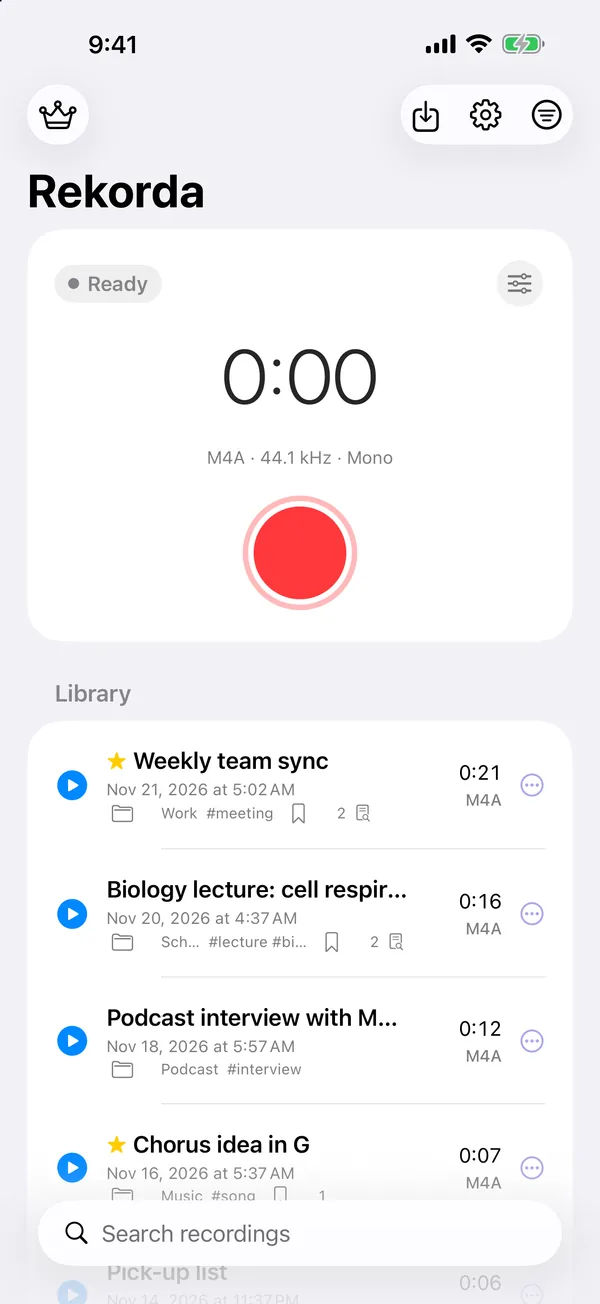
The record button is the biggest thing on the screen, and it is always in the same place.

  1. Rekorda home screen with a large red record button and a library of recordings such as Weekly team sync and Biology lecture.
    1

    Start from anywhere

    Tap record in the app, on the Home Screen widget, with Siri, or on iOS 18 and later from Control Center and the Action Button.

  2. A recording in progress with a live level meter and buttons to cancel, stop or pause.
    2

    Lock your phone

    Recording keeps going in the background. Pause, resume, or stop and save from the Lock Screen and the Dynamic Island.

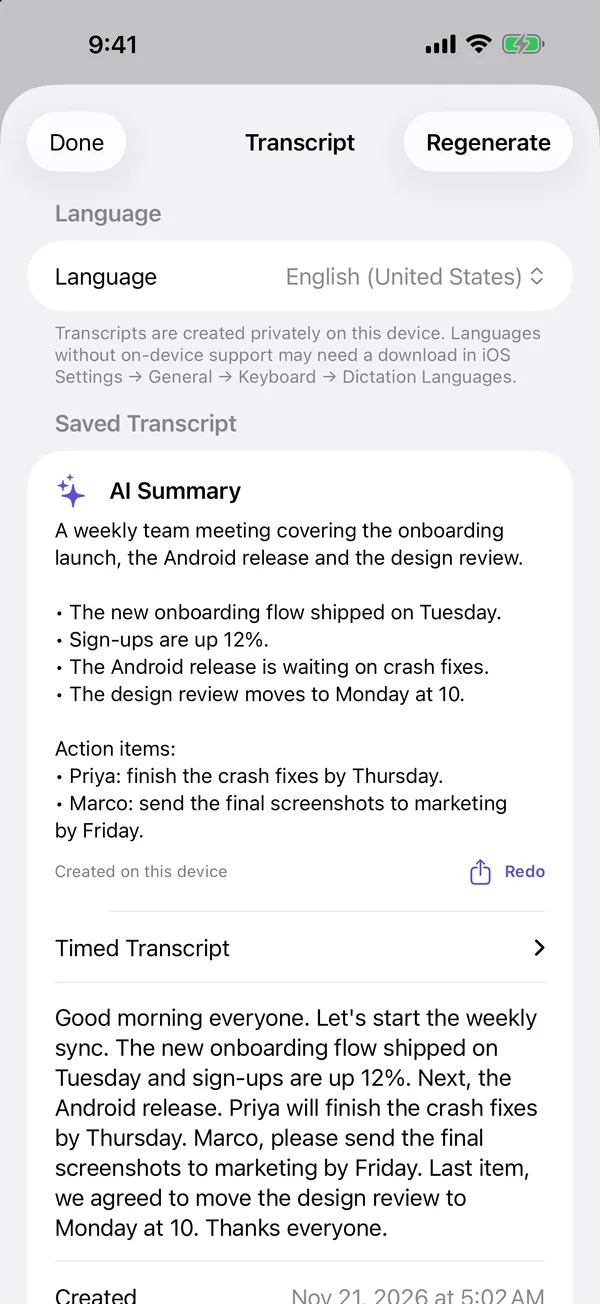
  3. Transcript screen with an AI Summary of a team meeting, key points, action items and the full transcript below.
    3

    Read it back

    Get a private transcript with timestamps you can tap, plus a summary with key points and action items on supported iPhones.

Lock Screen and Dynamic Island

Put the phone in your pocket. The recording keeps going.

Start recording a lecture and lock your iPhone. A Live Activity shows the timer on the Lock Screen and in the Dynamic Island, so you always know it is still recording.

  • Pause, resume, or stop and save from the Live Activity (iOS 17 and later)
  • A Record control for Control Center, the Lock Screen and the Action Button (iOS 18 and later)
  • Quick Record widget, and “Record with Rekorda” for Siri
  • Pause automatically during silence, or stop after a set time
  • Bluetooth, wired and USB microphones
Transcripts and AI summaries

Find the one sentence that mattered.

Rekorda turns speech into text on your iPhone in many languages. Tap a timestamp to hear that moment again, or search every title, tag, marker and transcript at once.

  • On-device transcription; choose the language for each recording
  • Timestamps that jump straight to that point in the audio
  • AI summary with key points and action items, made on device with Apple Intelligence
  • Share a summary, or select and copy any part of the transcript

AI summaries need iOS 26 or later on an iPhone that supports Apple Intelligence.

Transcript screen: language set to English (United States), an AI Summary with bullet points and action items, and the timed transcript.
Edit and organize

Clean up the take without losing the original.

Trim the silence at the start, continue an earlier recording, or enhance the audio with normalize, noise gate, fade and amplify. Every edit is saved as a new copy.

  • Markers with notes for the moments you want to find again
  • Folders, tags, favorites, sorting, and a Trash you can restore from
  • A 4-track studio: layer takes with volume, pan, mute and solo, then mix down
  • Playback speed, loop, sleep timer and 15-second skips
Private by design

Your recordings stay on your iPhone.

There is no Rekorda account and no Rekorda server. Recordings, transcripts and summaries live in the app's private storage until you choose to share them.

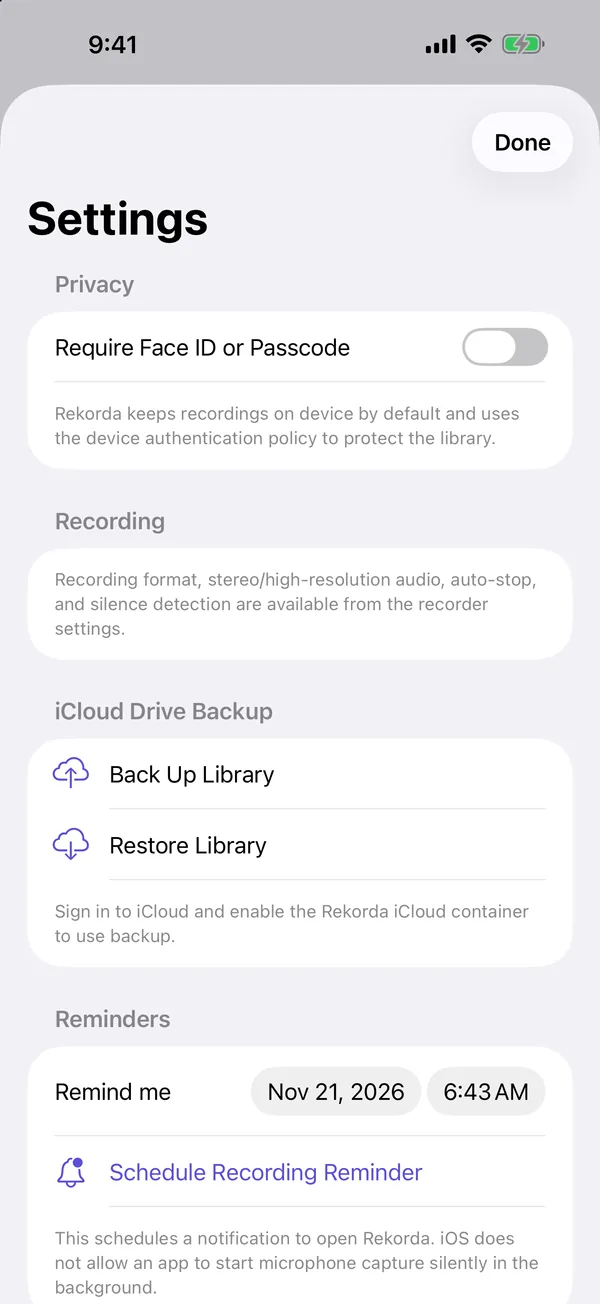
  • Optional Face ID or passcode lock that also hides your library in the app switcher
  • Back up and restore the whole library with your own iCloud Drive
  • Advertisers never get your recordings, transcripts or summaries
  • Import audio from the Files app; export only where you choose

Read the privacy policy for exactly what is processed and why.

Settings screen with Require Face ID or Passcode, iCloud Drive Backup with Back Up Library and Restore Library, and recording reminders.
Everything included

One app for every kind of recording

Meetings, lectures, interviews, podcasts, songs and quick voice memos. Every feature below is free.

  • One-tap recording

    M4A, WAV or CAF, mono or stereo, 44.1 or 48 kHz. A live level meter shows the mic is picking you up.

  • Records when locked

    Background recording with Lock Screen and Dynamic Island controls.

  • Widget, Siri and controls

    Start from the Home Screen, with your voice, or from Control Center and the Action Button.

  • Silence and timer

    Pause automatically while nobody is talking, or stop after the time you set.

  • Transcripts

    On-device speech to text in many languages, with tappable timestamps.

  • AI summaries

    Key points and action items from long recordings, created on your iPhone.

  • Search everything

    Find recordings by title, tag, marker or any word in the transcript.

  • Markers and notes

    Bookmark important moments and jump back to them during playback.

  • Trim and enhance

    Trim, continue a recording, normalize, noise gate, fade and amplify.

  • 4-track studio

    Layer up to four takes with volume, pan, mute and solo, then mix down.

  • Free export

    Save MP3, AAC or WAV copies to Files or share them to any app.

  • iCloud Drive backup

    Back up the library to your own iCloud Drive and restore it on a new iPhone.

Built from real reviews

We read 20,000 reviews of recorder apps. Then we fixed the complaints.

These are the problems people mention most often in App Store and Google Play reviews, and what Rekorda does about each one.

MP3 export is locked behind a subscription.

Export is free. MP3, AAC and WAV for everyone, and there is no subscription at all.

An ad popped up in the middle of my recording.

No ads while you record or play. Ads never sit next to the record button, and a full-screen ad shows at most once every ten minutes.

It stopped recording when I locked my phone.

Keeps recording in the background, with pause and stop on the Lock Screen and in the Dynamic Island.

My transcripts get uploaded to someone's server.

Transcripts and summaries are made on your iPhone. Rekorda has no server to upload them to.

I lost my recordings when I changed phones.

Back up the whole library to your own iCloud Drive and restore it on the new iPhone in one tap.

Pricing

Free. Or free without ads.

Rekorda has no subscription. Every feature works in the free version.

Free

Every feature, with ads

  • Recording, transcripts, summaries, editing and export
  • A small ad below your library, never next to the record button
  • Watch an optional short video for 30 minutes without ads

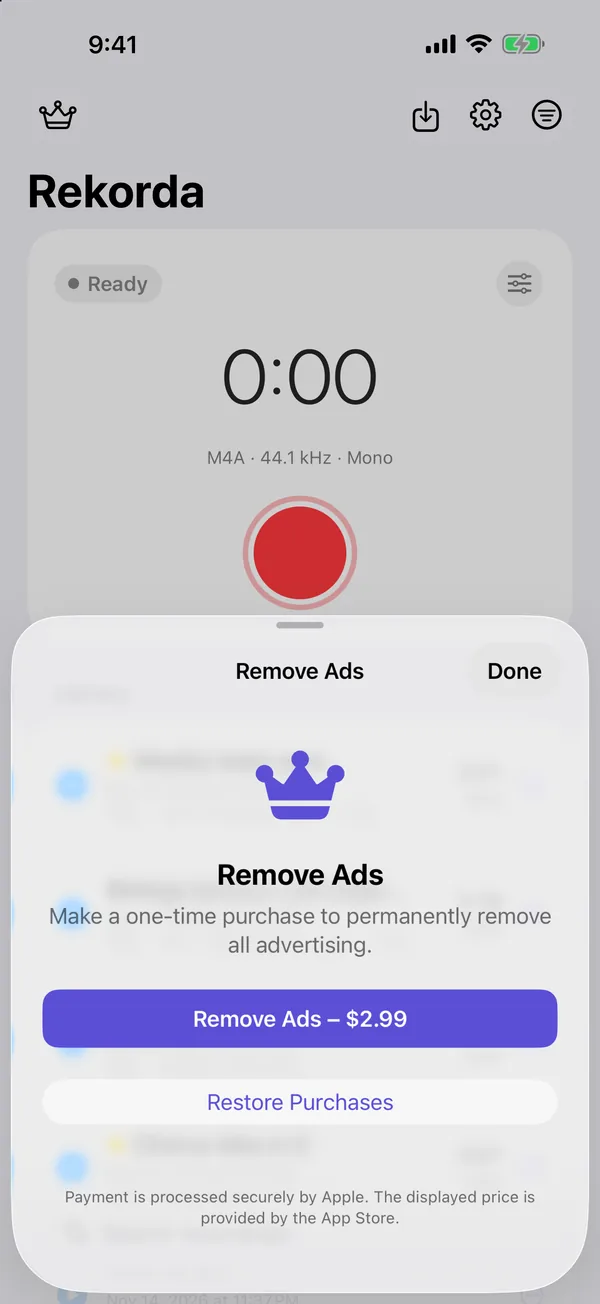
Remove Ads

One-time purchase

  • Turns off all ads for good
  • Restore it on your other iPhones with the same Apple Account
  • No renewal, no subscription, nothing to cancel
Remove Ads sheet: make a one-time purchase to permanently remove all advertising, with Restore Purchases below.
FAQ

Questions people ask

Is Rekorda free?

Yes. Every feature is free with ads. Remove Ads is a one-time purchase that turns ads off for good. There is no subscription.

Does it keep recording when the screen is locked?

Yes. Recording continues in the background until you pause or stop it, even while you use other apps. On iOS 17 and later you can pause, resume, or stop and save from the Lock Screen and the Dynamic Island.

Is there a time limit on recordings?

No. A recording can run as long as you need, limited only by the free storage on your iPhone. If you want one, set an automatic stop time before you start.

Are my recordings or transcripts uploaded anywhere?

No. Recordings stay in the app on your iPhone, and transcripts and summaries are created on the device. They leave your iPhone only when you export, share, or back them up to your own iCloud Drive.

Which languages can it transcribe?

The languages that Apple's on-device speech recognition supports on your iPhone, including English, Indonesian and many more. Choose the language on the Transcript screen. If one is missing, add it under iOS Settings, General, Keyboard, Dictation Languages.

Which iPhones can create AI summaries?

Summaries use Apple Intelligence on the device, so they need iOS 26 or later on an iPhone that supports Apple Intelligence, with Apple Intelligence turned on. Transcripts work on every supported iPhone.

How do I move my recordings to a new iPhone?

In Rekorda, open Settings and tap Back Up Library. On the new iPhone, sign in with the same Apple Account, install Rekorda, and tap Restore Library.

Can I use an external microphone?

Yes. Rekorda records from Bluetooth, wired and USB microphones, and you can pick the input in the recorder settings.

Is it legal to record a conversation?

Laws differ between countries and states. Some require everyone in the conversation to agree. Check the rules where you are and ask for consent before you record other people.

More answers on the support page.

Press record. Rekorda takes care of the rest.

Free on the App Store for iPhone. No account to create and nothing to set up before your first recording.

Download on the App Store